- Get Started
- Video Tutorials
- Knowledge Base
- FAQs & Troubleshooting
How to connect stores?
Updated on 2026-04-01 12:03:11
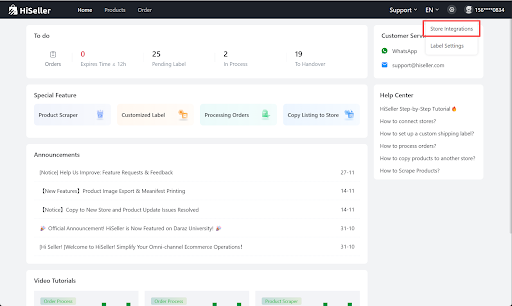
1. Go to HiSeller Settings > Store Integration, tap the Daraz icon
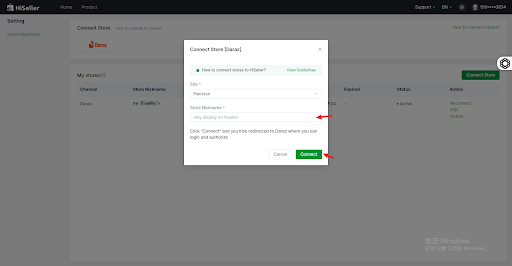
2. Enter the customer shop name and click the Connect button, and you will be redirected to the Daraz website
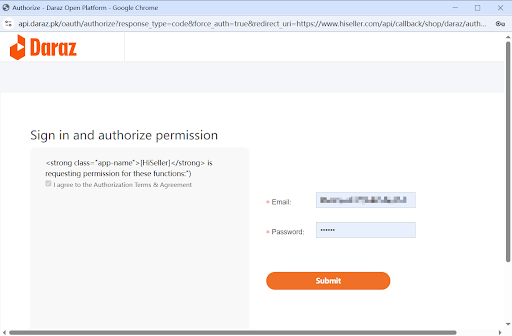
3. Input your Daraz seller account info and click Submit
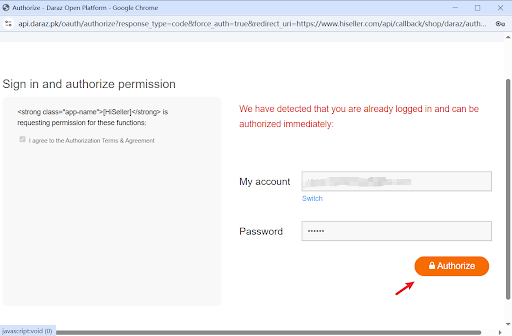
4. Click Authorize to confirm your consent for the authorization. Now your store has been connected to HiSeller successfully
💡 Note: All data transmission is based on the official API interface of Marketplace. Your store account, password, bank information, and other personal privacy information are all supervised by Marketplace. HiSeller has no right and cannot access or modify them.